| View previous topic :: View next topic |
| Author |
Message |
O-Family
Joined: 23 May 2010
Posts: 352
Location: Japan

|
 Posted: Tue Sep 24, 2024 5:48 am Post subject: Posted: Tue Sep 24, 2024 5:48 am Post subject: |
 |
|
I can't think of any use for a round LCD other than a wristwatch.
What is it used for? |
|
| Back to top |
|
 |
boeseturbo
Joined: 23 Jul 2007
Posts: 66

|
| Posted: Tue Sep 24, 2024 3:08 pm Post subject: |
|
|
automotive gauges  )) )) |
|
| Back to top |
|
|
boeseturbo
Joined: 23 Jul 2007
Posts: 66
|
| Posted: Tue Sep 24, 2024 3:19 pm Post subject: |
|
|
will try this out Found it on russian forum
but I believe it will be slow, no asm  |
|
| Back to top |
|
|
boeseturbo
Joined: 23 Jul 2007
Posts: 66
|
| Posted: Wed Sep 25, 2024 12:33 pm Post subject: |
|
|
tried the GC9 lib today.... it works on first try on my AVR128DA32. 12MHZ SPI but slow, very slow maybe anybody can help to transform it to ASM?
Cheers |
|
| Back to top |
|
|
O-Family
Joined: 23 May 2010
Posts: 352
Location: Japan
|
| Posted: Thu Sep 26, 2024 1:30 am Post subject: |
|
|
Color LCDs require multiple commands and color data to be sent to draw a single dot.
Controlling this with SPI requires a considerable amount of processing power.
Even in the published program, the SPI processing calls an assembler routine in BASCOM, so even if you rewrite everything else in assembler, I think you'll only be able to improve the drawing speed by 20% at best.
Increasing the CPU clock can also provide some improvement, but 8-bit AVRs have their limits.
If you want drawing speeds on par with those of commercially available watches, I think it will be difficult to achieve unless you use a 32-bit CPU and LCD in parallel mode. |
|
| Back to top |
|
|
boeseturbo
Joined: 23 Jul 2007
Posts: 66
|
| Posted: Mon Sep 30, 2024 7:48 am Post subject: |
|
|
| O-Family wrote: | Color LCDs require multiple commands and color data to be sent to draw a single dot.
Controlling this with SPI requires a considerable amount of processing power.
Even in the published program, the SPI processing calls an assembler routine in BASCOM, so even if you rewrite everything else in assembler, I think you'll only be able to improve the drawing speed by 20% at best.
Increasing the CPU clock can also provide some improvement, but 8-bit AVRs have their limits.
If you want drawing speeds on par with those of commercially available watches, I think it will be difficult to achieve unless you use a 32-bit CPU and LCD in parallel mode. |
yes you might be right. Do you have SSD1306 SPI libary? Maybe I go back to black/white OLED But i2c is a bit to slow for me Maybe you can help here?
Cheers |
|
| Back to top |
|
|
boeseturbo
Joined: 23 Jul 2007
Posts: 66
|
| Posted: Mon Sep 30, 2024 9:16 am Post subject: |
|
|
| O-Family wrote: | Color LCDs require multiple commands and color data to be sent to draw a single dot.
Controlling this with SPI requires a considerable amount of processing power.
Even in the published program, the SPI processing calls an assembler routine in BASCOM, so even if you rewrite everything else in assembler, I think you'll only be able to improve the drawing speed by 20% at best.
Increasing the CPU clock can also provide some improvement, but 8-bit AVRs have their limits.
If you want drawing speeds on par with those of commercially available watches, I think it will be difficult to achieve unless you use a 32-bit CPU and LCD in parallel mode. |
Can you integrate also xtiny support for ST7789 libary?
Cheers |
|
| Back to top |
|
|
boeseturbo
Joined: 23 Jul 2007
Posts: 66
|
| Posted: Mon Sep 30, 2024 11:02 am Post subject: |
|
|
| tried today the round ST7789 and it works.... But one question: What is different at color8x8.font ? That is the only font which is working |
|
| Back to top |
|
|
O-Family
Joined: 23 May 2010
Posts: 352
Location: Japan
|
| Posted: Mon Sep 30, 2024 1:09 pm Post subject: |
|
|
The SSD1306 SPI library should be in the LIB folder.
glcdSSD1306-SPI.lib
In the case of monochrome, data is written in 8-bit units, so I don't think there is a big difference in drawing speed between SPI and I2C.
Reading fonts and calculating graphics takes more time than the transfer speed.
What is the problem with the ST7789 font?
Monochrome fonts and color fonts cannot be reused because the data structure is different.
To convert monochrome fonts to color fonts, you can use the following [Color_Font_Converter.exe].
https://www.mcselec.com/index2.php?option=com_forum&Itemid=59&page=viewtopic&t=13094&highlight=color+colour+font+converter |
|
| Back to top |
|
|
boeseturbo
Joined: 23 Jul 2007
Posts: 66
|
| Posted: Mon Sep 30, 2024 2:15 pm Post subject: |
|
|
| O-Family wrote: | The SSD1306 SPI library should be in the LIB folder.
glcdSSD1306-SPI.lib
In the case of monochrome, data is written in 8-bit units, so I don't think there is a big difference in drawing speed between SPI and I2C.
Reading fonts and calculating graphics takes more time than the transfer speed.
What is the problem with the ST7789 font?
Monochrome fonts and color fonts cannot be reused because the data structure is different.
To convert monochrome fonts to color fonts, you can use the following [Color_Font_Converter.exe].
https://www.mcselec.com/index2.php?option=com_forum&Itemid=59&page=viewtopic&t=13094&highlight=color+colour+font+converter |
thank you very much for the st7789 help....
Fonts are working in colormode. But I try to make a 64x36pixel font. Also tried 64x32 or 64x40.... Display shows nothing than
Can we speed up the ST7789 with hardware SPI?
Cheers |
|
| Back to top |
|
|
O-Family
Joined: 23 May 2010
Posts: 352
Location: Japan
|
| Posted: Tue Oct 01, 2024 1:31 pm Post subject: |
|
|
I can display large fonts such as 24x16 and 40x32 dots without any problems.
If nothing is displayed, there may be something wrong with the way the font is created.
When the size becomes 64x36, the number of dots to be drawn increases dramatically, so I don't think that changing to hardware SPI will result in an instantaneous change in the display. |
|
| Back to top |
|
|
boeseturbo
Joined: 23 Jul 2007
Posts: 66
|
| Posted: Tue Oct 01, 2024 2:39 pm Post subject: |
|
|
have now 80x48 fontsize. I splitted it to 2x 40x48 and this is working. )) Speed is also okay now
Measured on spi about 1,8MHz (with multimeter).... |
|
| Back to top |
|
|
rwlee
Joined: 04 Aug 2008
Posts: 55
Location: Portland Oregon

|
| Posted: Wed Jan 14, 2026 6:18 am Post subject: 240x240dot ST7789V |
|
|
| O-Family wrote: | I think it will work with the 1.3inch 240x240dot ST7789V library on this thread.
glcd-ST7789V_1R3_240x240.lib [revision 003]
or
glcd-ST7789V2_V3_1R69_240x280.lib
If you have any problems, I think I can help. |
Are you using the Bascom AVR Font tool to generate the Font?
My font ends up looking like this Which is a 12 x 16 ...
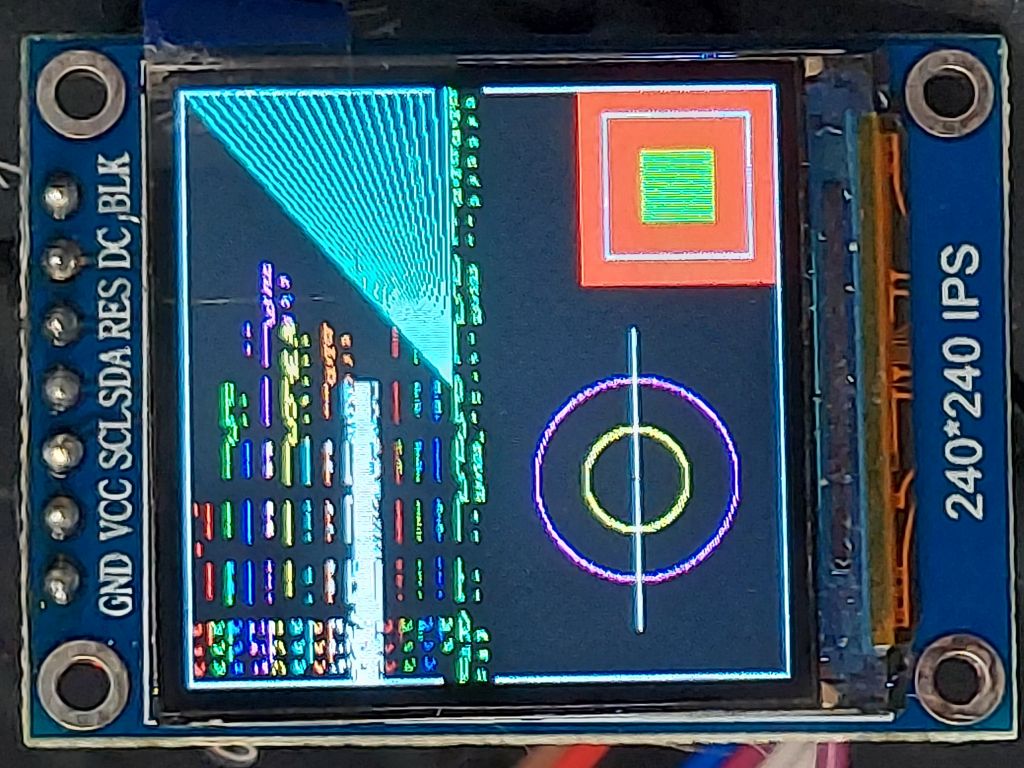
No matter what size I genarate the all turn out the same. |
|
| Back to top |
|
|
O-Family
Joined: 23 May 2010
Posts: 352
Location: Japan
|
| Posted: Wed Jan 14, 2026 8:35 am Post subject: |
|
|
The color LCD library created for BASCOM's graphic commands has only supported X-axis font sizes that are multiples of 8 bits since its early days.
This was likely due to concerns that supporting a variety of font sizes would slow down drawing due to the increased processing required. |
|
| Back to top |
|
|
rwlee
Joined: 04 Aug 2008
Posts: 55
Location: Portland Oregon
|
| Posted: Thu Jan 15, 2026 11:23 am Post subject: |
|
|
| O-Family wrote: | The color LCD library created for BASCOM's graphic commands has only supported X-axis font sizes that are multiples of 8 bits since its early days.
This was likely due to concerns that supporting a variety of font sizes would slow down drawing due to the increased processing required. |
Thanks for the info. Can you tell me how to get the fonts for this display?
Thanks, Wayne |
|
| Back to top |
|
|
|
 FAQ
FAQ Search
 Register
 Log in


