| View previous topic :: View next topic |
| Author |
Message |
Duval JP
Joined: 22 Jun 2004
Posts: 1232
Location: France

|
 Posted: Mon Dec 08, 2025 5:49 pm Post subject: pcint change Posted: Mon Dec 08, 2025 5:49 pm Post subject: pcint change |
 |
|
Hello
I would like to use a PCchange interrupt on an ATMEGA1284P.
The goal is to read a light sensor that returns a 1 when it detects a change.
It works when I control it in the main loop.
| Code: | Ir_detect Alias Pinc.3 ' data in detecteur présence
Config Ir_detect = Input
do
'--
'--
if ir_detect=1 then 'gestion de l'alumage ecran
Flag_detect = 100
Call Nex_light(100) 'on éclaire l'horloge
End If
'--
'--
loop
|
but when I go out the loop that doesn't work...
I have very few free pins. I would like to use PC3, but I'm using PC0 and PC1 for the I2C port. Therefore, I can't declare the entire port as an input, only PC3.
I tried the PCINT_CHANGE.BAS example, trying to change the masks:
but it doesn't work.
how must i write the register to have an interrupt which jump to
| Code: |
isr_pcint19: 'interruption
Flag_detect = 1
Return
|
thanks for your help
JP
:wink:
(BASCOM-AVR version : 2.0.8.7 )
_________________
pleasure to learn, to teach, to create |
|
| Back to top |
|
 |
MWS
Joined: 22 Aug 2009
Posts: 2377

|
| Posted: Mon Dec 08, 2025 6:21 pm Post subject: Re: pcint change |
|
|
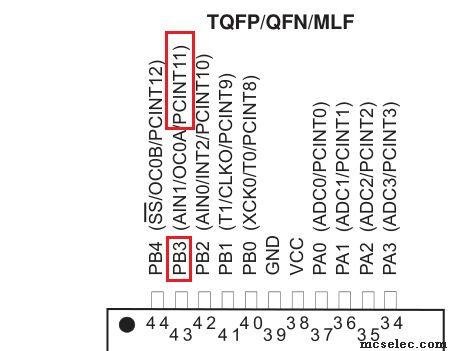
You may name the ISRs however you want, but are you aware that there are only 4 PC-interrupts - PCINT0 ... PCINT3 -, each serving one port of 8 pins?
Corresponding for each interrupt are the PCMSK0 ... PCMSK3 registers.
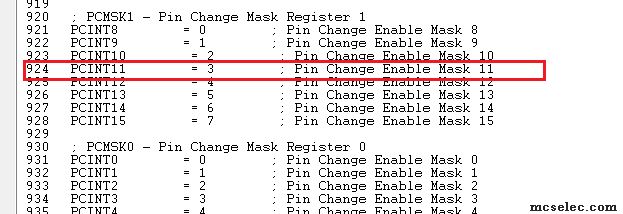
The IO-pin with name PCINT19 (0..7, 8..15, 16..23, 24..31) belongs thus to the 3rd PCINT-vector, which is PCINT2, the mask register is thus PCMSK2 and the bit to set within PCMSK2 from 0..7 is number 3. |
|
| Back to top |
|
|
EDC
Joined: 26 Mar 2014
Posts: 1180

|
|
| Back to top |
|
|
Duval JP
Joined: 22 Jun 2004
Posts: 1232
Location: France
|
| Posted: Tue Dec 09, 2025 12:32 pm Post subject: |
|
|
sorry but no success
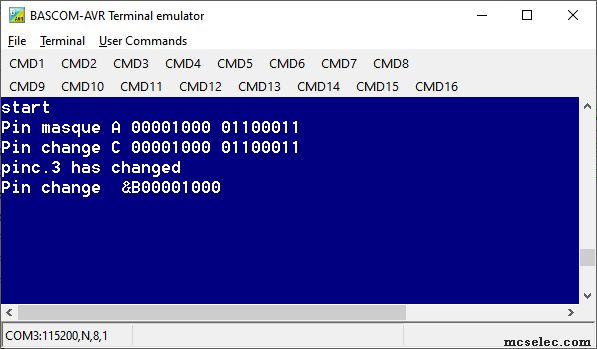
my code | Code: |
'-----------------------------------------------------------------------------------------------------------------------------
$regfile = "m1284pdef.dat" ' "m1284pdef.dat" ' "m1284def.dat"
$crystal = 16000000 '20000000 '16000000 ' 11052000
$hwstack = 375 '375 '300
$swstack = 300 '200
$framesize = 300 '300
Config Submode = New
Debug On ' if you debug off you remove all print from USB port
Const Updateeprom = 1 ' to keep eeprom var safe
'port for debug--- USB ------------------------------
Config Com1 = 115200 , Synchrone = 0 , Parity = None , Stopbits = 1 , Databits = 8 , Clockpol = 0
Echo Off
Config Serialin0 = Buffered , Size = 15
Config Serialout0 = Buffered , Size = 15 'RX from Terminal
Open "COM1:" For Binary As #1
Const Usb = 1
dim Flag_detect as byte
Config Pinc.3 = Input
Enable Interrupts 'enable global ints
Enable Pcint2
Pcmsk2 = &B00001000
flag_detect=0
Wait 5 ' to wait for terminal
Debug#usb , "start"
On Pcint2 isr_pcint19
Debug#usb ,"Pin masque A " ; Bin(pcmsk2) ; " " ; Bin(pinC)
Do
! nop
If flag_detect = 1 Then ' change detected
Debug#usb , "pinc.3 has changed" 'in this case it must be pinc.0
Debug#usb ,"Pin change B" ; Bin(pcmsk2)
flag_detect=0
End If
Loop
isr_pcint19: 'interruption si présence humaine
Debug#usb ,"Pin change C " ; Bin(pcmsk2) ; " " ; Bin(pinC)
Flag_detect = 1
Return
End
|
i'm sure of my detector , it changes when I open the black box where it is closed

_________________
pleasure to learn, to teach, to create |
|
| Back to top |
|
|
EDC
Joined: 26 Mar 2014
Posts: 1180
|
|
| Back to top |
|
|
MWS
Joined: 22 Aug 2009
Posts: 2377
|
| Posted: Tue Dec 09, 2025 1:52 pm Post subject: |
|
|
Try it this way:
| Code: | Do
! nop
If flag_detect = 1 Then ' change detected
Debug#usb , "pinc.3 has changed" 'in this case it must be pinc.0
Debug#usb ,"Pin change B" ; Bin(pcmsk2)
flag_detect=0
PCIFR.PCIF2 = 1 ' clear pending pc-ints
Enable PCINT2 ' re-enable pcint2
End If
Loop
isr_pcint19: 'interruption si présence humaine
If PINC.3 = 1 Then ' pin is high? means we got a rising edge
Disable PCINT2
Debug#usb ,"Pin change C " ; Bin(pcmsk2) ; " " ; Bin(pinC)
Flag_detect = 1
End If
Return |
You get easily multiple triggers of the ISR, additionally the ISR is triggered on rising as well as falling flanks, you need to sort out yourself.
Be aware that in case the signal oscillates and then flanks are faster than execution time from interrupt vector table to testing via 'If PINC.3 = 1', getting the correct flank may fail.
In this case it helps to catch the pin-status very early within the ISR with some ASM-code. |
|
| Back to top |
|
|
port
Joined: 23 Sep 2025
Posts: 12

|
| Posted: Tue Dec 09, 2025 5:49 pm Post subject: |
|
|
Maybe I didn't understand the core problem.
But the following code worked for me on the physical AVR.
| Code: |
$regfile = "m1284pdef.dat"
$crystal = 18432000
$hwstack = 64
$swstack = 64
$framesize = 64
$baud = 9600
Config PinC.3 = Input
Config Portb.3 = Output
PortC.3 = 1
Enable PCINT2
Enable Interrupts
PCICR = &B00000100
Pcmsk2 = &B00001000
Enable PCINT2
On Pcint2 isr_pcint19
Do
' nix
loop
isr_pcint19:
toggle PortB.3
Waitms 100
Bitwait PinC.3 , Set
Waitms 1
PCIFR.PCIF2 = 1
Return
End |
|
|
| Back to top |
|
|
Duval JP
Joined: 22 Jun 2004
Posts: 1232
Location: France
|
| Posted: Tue Dec 09, 2025 6:18 pm Post subject: |
|
|
many thank EDC and MWS !
Yes it works now
pull-up or not pull up ?a good question
My device send a 1 ,
if I put a pull up then change will be when it goes down. right?
if I don't the change goes up when I go up. right again ?
for the others bascom-users I forgot the flag register.
13.2.5 PCIFR – Pin Change Interrupt Flag Register
• Bit 3– PCIF3: Pin Change Interrupt Flag 3
When a logic change on any PCINT31:24 pin triggers an interrupt request, PCIF3 becomes set (one). If the I-bit
in SREG and the PCIE3 bit in PCICR are set (one), the MCU will jump to the corresponding Interrupt Vector.
The flag is cleared when the interrupt routine is executed. Alternatively, the flag can be cleared by writing a
logical one to it.
• Bit 2 – PCIF2: Pin Change Interrupt Flag 2
When a logic change on any PCINT23:16 pin triggers an interrupt request, PCIF2 becomes set (one). If the I-bit
in SREG and the PCIE2 bit in PCICR are set (one), the MCU will jump to the corresponding Interrupt Vector.
The flag is cleared when the interrupt routine is executed. Alternatively, the flag can be cleared by writing a
logical one to it.
Me must
- give a good mask
| Code: | Pcmsk2 = &B00001000 |
here
- choice the good register as said EDC following the dat file
-clear the flag
| Code: | PCIFR.PCIF2 = 1 ' clear pending pc-ints |
- pull up the port
- config the port in input
the final code

jp | Code: |
$regfile = "m1284pdef.dat" ' "m1284pdef.dat" ' "m1284def.dat"
$crystal = 16000000 '20000000 '16000000 ' 11052000
$hwstack = 375 '375 '300
$swstack = 300 '200
$framesize = 300 '300
Config Submode = New
Debug On ' if you debug off you remove all print from USB port
Const Updateeprom = 1 ' to keep eeprom var safe
'port for debug--- USB ------------------------------
Config Com1 = 115200 , Synchrone = 0 , Parity = None , Stopbits = 1 , Databits = 8 , Clockpol = 0
Echo Off
Config Serialin0 = Buffered , Size = 15
Config Serialout0 = Buffered , Size = 15 'RX from Terminal
Open "COM1:" For Binary As #1
Const Usb = 1
dim Flag_detect as byte
Config Pinc.3 = Input : Portc.3 = 1 'pullup
Enable Interrupts 'enable global ints
Enable Pcint2
Pcmsk2 = &B00001000
flag_detect=0
Wait 5 ' to wait time to go tot the terminal
Debug#usb , "start"
On Pcint2 isr_pcint19
Do
! nop
If flag_detect = 1 Then ' change detected
Debug#usb ,"flag-detect "; Flag_detect
flag_detect=0
PCIFR.PCIF2 = 1 ' clear pending pc-ints
Enable PCINT2 ' re-enable pcint2
End If
Loop
isr_pcint19: 'interruption si présence humaine
If PINC.3 = 1 Then ' pin is high? means we got a rising edge
Disable PCINT2
Flag_detect = 1
End If
Return
end |
_________________
pleasure to learn, to teach, to create |
|
| Back to top |
|
|
MWS
Joined: 22 Aug 2009
Posts: 2377
|
| Posted: Tue Dec 09, 2025 6:45 pm Post subject: |
|
|
| port wrote: | | Maybe I didn't understand the core problem. |
| Duval JP wrote: | It works when I control it in the main loop.
...
but when I go out the loop that doesn't work... |
The TO doesn't want to wait in one place. |
|
| Back to top |
|
|
Duval JP
Joined: 22 Jun 2004
Posts: 1232
Location: France
|
| Posted: Tue Dec 09, 2025 7:01 pm Post subject: |
|
|
to MWS
| Quote: | | he TO doesn't want to wait in one place. |
Yes i know,
before searching how to make a change interrupt
I checked the port in my main loop
| Code: |
Ir_detect Alias Pinc.3 ' data in detecteur présence
Config Ir_detect = Input |
then
| Code: |
do
if ir_detect=1 then 'gestion de l'alumage ecran
Flag_detect = 100
Call Nex_light(100) 'on éclaire l'horloge
End If
loop
|
but how I have to check the light of the screen in an other page(nextion display)
So I need better control, hence the use of the interrupt.
Many thanks for your help
JP
_________________
pleasure to learn, to teach, to create |
|
| Back to top |
|
|
MWS
Joined: 22 Aug 2009
Posts: 2377
|
| Posted: Tue Dec 09, 2025 9:31 pm Post subject: |
|
|
| Duval JP wrote: | | Many thanks for your help |
You're welcome. |
|
| Back to top |
|
|
|
 FAQ
FAQ Search
 Register
 Log in