| View previous topic :: View next topic |
| Author |
Message |
Tiny
Joined: 10 Nov 2010
Posts: 116
Location: The Netherlands

|
 Posted: Fri Apr 25, 2025 6:01 am Post subject: running BASCOM on windows 11 arm error code 320 Posted: Fri Apr 25, 2025 6:01 am Post subject: running BASCOM on windows 11 arm error code 320 |
 |
|
Hello,
i have installed Bascom in a virtual windows 11 machine that is on a MacBook with an ARM cpu
if a try to compile sorting is get "Error : 320 line : 0 [syntax error = '@ ']" , in File :
this happens in bascom-avr 2086 2087
What does error 320 means, its not on the error list in the help file
Greetings Tiny
example code
| Code: |
$Regfile="xm256a3udef.dat"
$Crystal=4000000
$hwstack=40
$swstack=16
$framesize=32
dim a as byte
dim b as byte
for a = 1 to 10
b = 0
b = b + a
next
end
|
(BASCOM-AVR version : 2.0.8.7 ) |
|
| Back to top |
|
 |
albertsm
Joined: 09 Apr 2004
Posts: 6274
Location: Holland

|
| Posted: Fri Apr 25, 2025 8:49 am Post subject: |
|
|
it is a syntax error. for some reason there is an @ in your code?
make sure the file is ansi. your code works for me.
you can also turn on invisible chars to see if your code contains odd invisible chars.
_________________
Mark |
|
| Back to top |
|
|
Tiny
Joined: 10 Nov 2010
Posts: 116
Location: The Netherlands
|
| Posted: Sat May 03, 2025 6:20 pm Post subject: |
|
|
Hi Mark
sorry for the late reply, I was on a vacation.
The file in in ansi format.
All of my previous programma's that compiles on another real windows machine, give on this virtual machine that is running on a new MacBook with a M4 processor the same error, so ik should be something on this machine.
I'm using vmfusion "Professional Version 13.6.3" |
|
| Back to top |
|
|
Dibor
Joined: 04 Dec 2004
Posts: 141
Location: ISRAEL

|
| Posted: Fri Oct 03, 2025 7:03 am Post subject: Re: running BASCOM on windows 11 arm error code 320 |
|
|
| Tiny wrote: | Hello,
"Error : 320 line : 0 [syntax error = '@ ']"
(BASCOM-AVR version : 2.0.8.7 ) |
Hi
I use Bascom under Parallels VM with Windows 11 ARM
I have get same errors.
Try to delete bascavr2087.log located in C:\Users\..........\AppData\Roaming\MCS Electronics
Have also check/compile problem, I should to do few times check or compile, because commands do not ends, I should to cancel them and rerun them.

And after compiling Bascom process takes more then 70% of CPU resources

Version 2.0.8.6 working w/o those issues. |
|
| Back to top |
|
|
Dibor
Joined: 04 Dec 2004
Posts: 141
Location: ISRAEL
|
| Posted: Mon Nov 17, 2025 12:58 pm Post subject: |
|
|
Anybody else used Bascom under Windows 11 ARM???
I can not to use latest version 
I am back to 2.0.8.6 version, there works w/o stacking.
Thank U |
|
| Back to top |
|
|
Dibor
Joined: 04 Dec 2004
Posts: 141
Location: ISRAEL
|
| Posted: Wed Nov 26, 2025 10:45 pm Post subject: |
|
|
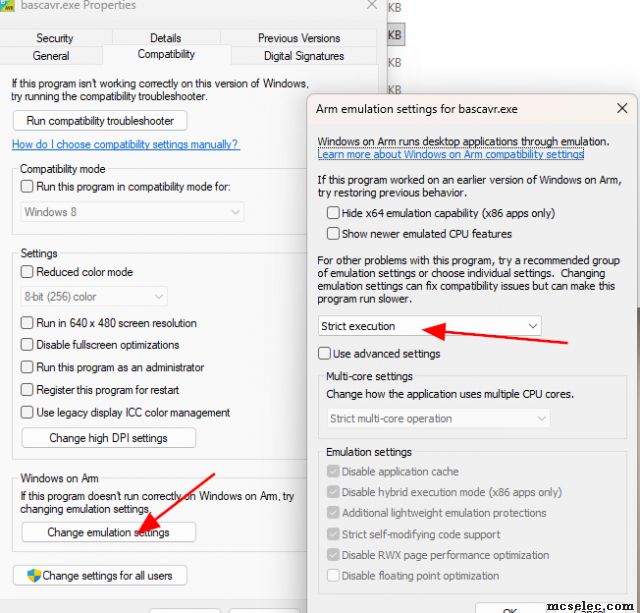
For properly work needs to do some settings in"Compatibility"
I did it also for previous versions, only forgot.
 |
|
| Back to top |
|
|
Tiny
Joined: 10 Nov 2010
Posts: 116
Location: The Netherlands
|
| Posted: Sat Nov 29, 2025 7:46 am Post subject: |
|
|
| Thanks Dibor, this works for me even at version 2.0.8.7 |
|
| Back to top |
|
|
|
 FAQ
FAQ Search
 Register
 Log in


